Arduinoのブートローダが破損した場合の修復方法を説明します。格安互換機などで動作がおかしくなった場合に有効です。
Arduinoを使っているときに、ときどき動作がおかしくなってしまうときがありますよね。
自分の作ったスケッチがバグっているなら、スケッチを修正してファームウェアを再度ダウンロードすればいいのですが、まれにブートローダ(Bootloader)がおかしくなってしまう場合があります。
純正品ではあまりないと思いますが、格安の互換機でちょっと変則的な使い方をするとときどき発生します。
ブートローダーがやられると、通常のバグとは全く異なる動作をしてしまいなにがなんだかわからない状況に陥ってしまいます。
そのような**「Arduinoがなんかおかしくなっちゃった!」というかたのためにブートローダを修復する方法を記載します**。
「なんかわからんけどそもそも全然動かん!」というかたは目を通して見ていただければなと思います。
内容としては、公式サイトの Arduino as ISP and Arduino Bootloaders をやって見ただけという感じですので、
英語が得意なかたは公式の方を見ていただいた方が早いかもしれません。
Arduinoのブートローダ#
Arduinoのブートローダは電源オン時にユーザーのスケッチをロードする(実行する)以外に、「PCと接続する」「スケッチをROMに書き込む」などの基本的な機能も提供しています。
つまり、ブートローダが破損すると「PCとの接続ができない、COMポートから見えない、もしくは接続が不安定になる」「コンパイルしたスケッチをダウンロードしようとしたらエラーが出てしまう」などの症状が発生します。
ブートローダの修復に必要なもの#
ブートローダはROM(EEPROM)に格納されているため、PCからは書き換えできません。
例えばArduino用ブートローダ/スケッチライタキットのようなキットを使えば書き換え可能です。
このようなキットは、ブートローダをガチャガチャいじるようなマニアな人は持っているかもしれませんが、標準のブートローダで事足りるかたは普通持っていないかと思います。
また、ブートローダ復旧のためにキットを買うのもなんだか躊躇してしまうかもしれません。そこで今回はライタキットでなく、普通のArduinoをライタ代わりに使います(つまりブートローダを書き換えるために、もう1枚正常動作するArduinoを使います)。
Arduinoを2枚持っているかたもあまり多くはないかもしれませんが、値段の安さと、ライタと違って通常使用で予備として使えることを考えれば、ライタよりも普通のArduinoを代用した方がリーズナブルかなと思います。
今回は例として、下記のArduinoUno 互換品を使います。ワンコインで買えちゃうのでお財布に優しいです。もちろん純正でもOKです。
リンク
Arduino をブートローダのライタ(ISP:In-circuit Serial Programmer)として使う#
ライタ側のArduinoUNO の準備#
まず、ブートローダが正常に動く方、つまりライタ側のArduinoをPCと接続します。
そしてArduino IDEを起動して、「ArduinoISP」というスケッチを開きます。下記の図を参照してください。
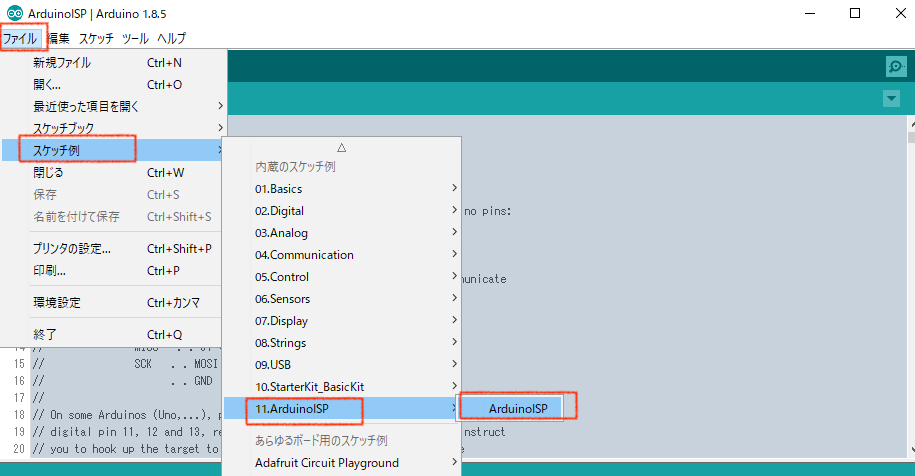
次に、そのスケッチをArduinoにダウンロードします。通常通りにボタンをポチッとすればOKです。
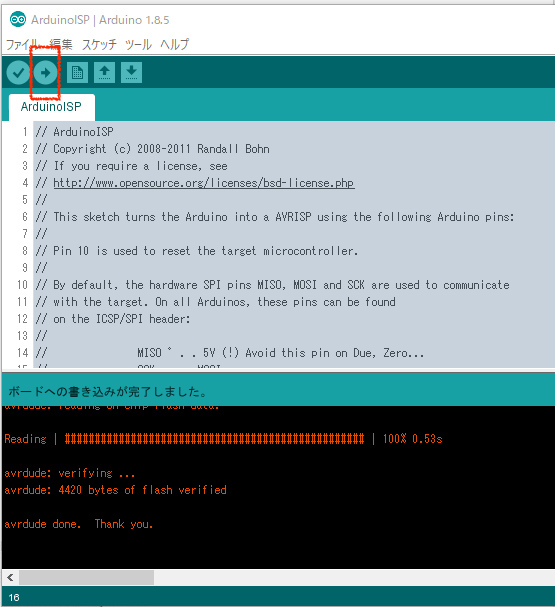
これでこのArduinoはブートローダのライタとして動作可能になりました。
ライタ側のArduinoと書き込まれる側のArduinoの接続#
まず、念のために両方のArduinoをPCから外しておきます(電源を供給していな状態にしておきます)。そしてライタ側のArduinoと書き込まれる側のArduinoを接続します。
通常ブートローダを書き込む際はICSPコネクタを使います。もちろんこれを使ってもいいのですが、ライタ側のArduinoと書き込まれる側のArduinoが同じ製品ならサクッと各SPIピン同士をつなげてしまう方が楽です、ICSPのピン配置をチェックするめんどうがないので。
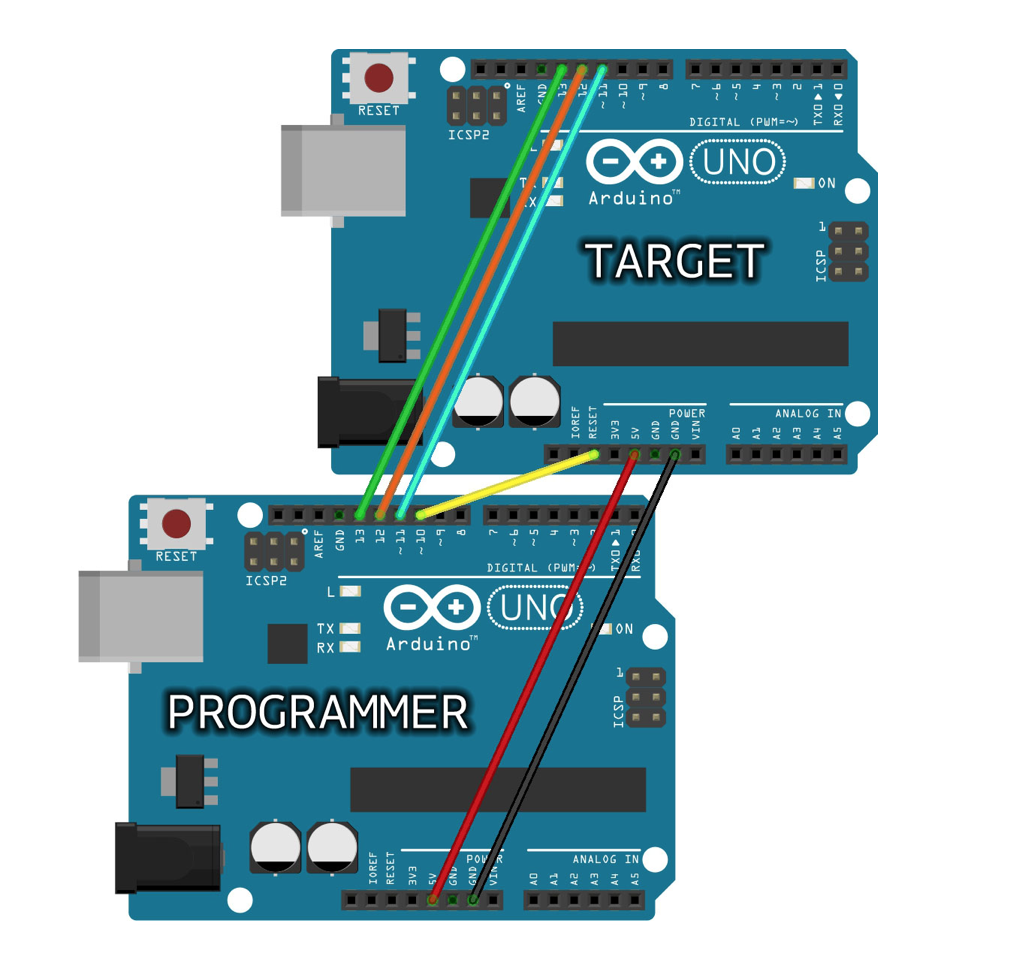
今回は例としてライタ側、書き込まれる側ともにArduinoUNOをしています。その場合の配線は下記のようにします。全部で6本です。
Note
基本は「同じピン同士」を接続します。例外は1つだけで、ライタ側の10ピンを、書き込まれる側のRSTに接続します。
| No. | ライタ側(UNO) | 書き込まれる側(UNO) | 信号/役割 |
|---|
| 1 | 10ピン | RST | リセット |
| 2 | GND | GND | GND |
| 3 | 5V | 5V | 電源 |
| 4 | 11ピン | 11ピン | MOSI |
| 5 | 12ピン | 12ピン | MISO |
| 6 | 13ピン | 13ピン | SCK |
配線したらこんな感じです(公式サイトより抜粋)。すごく簡単ですね。
実際の基板を配線するとこんな感じになります。今回は純正品でなく
純正品でないですが、純正品でも同じです。
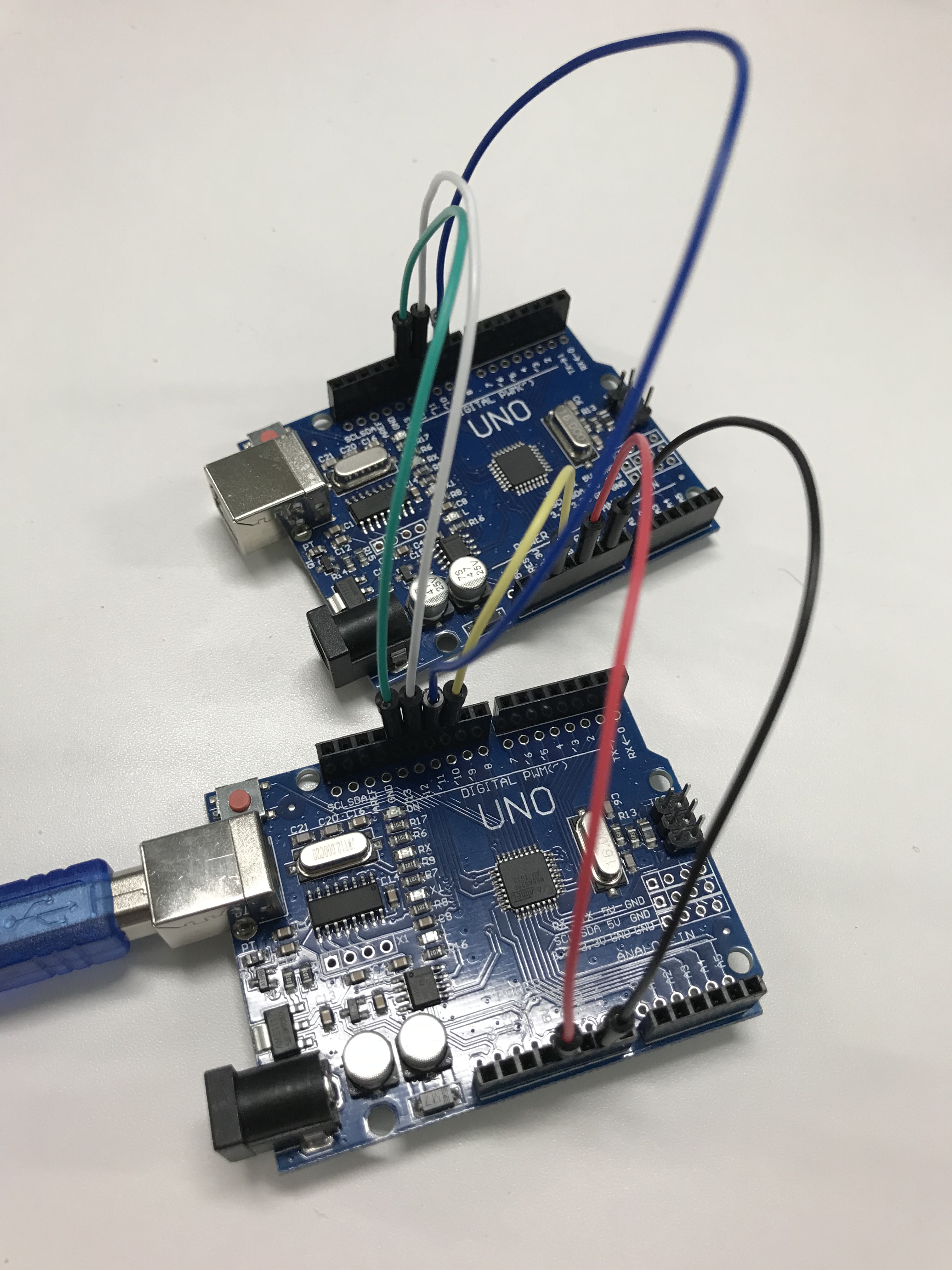
これで配線は完了です。簡単ですね。
ブートローダの書き込み#
いよいよブートローダの修復です。まず、ライタ側のArduinoUNOをPCと接続します。書き込まれる側はPCとは接続しません。配線にて5Vをつないでいるので電源はライタ側のArduinoから供給されます。
次に Arduino
IDE を起動してメニュー「ツール」から「書込装置」を設定します。「Arduino as ISP」というものを選択してください。
似たような名前のものがあるので間違えないように注意してください。「ArduinoISP」ではありません。
ここまでくればあとは、「ブートローダを書き込む」をポチッとすればOKです。下記の図を参考にして見てください。
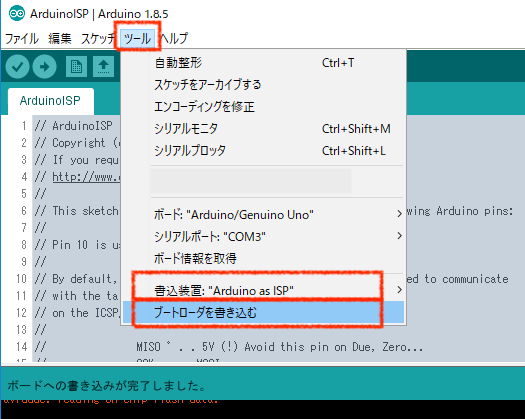
書き込みには数分くらいかかるかもしれません。IDE上に下記のようなログが出るはずです。
ログを展開
  1
  2
  3
  4
  5
  6
  7
  8
  9
 10
 11
 12
 13
 14
 15
 16
 17
 18
 19
 20
 21
 22
 23
 24
 25
 26
 27
 28
 29
 30
 31
 32
 33
 34
 35
 36
 37
 38
 39
 40
 41
 42
 43
 44
 45
 46
 47
 48
 49
 50
 51
 52
 53
 54
 55
 56
 57
 58
 59
 60
 61
 62
 63
 64
 65
 66
 67
 68
 69
 70
 71
 72
 73
 74
 75
 76
 77
 78
 79
 80
 81
 82
 83
 84
 85
 86
 87
 88
 89
 90
 91
 92
 93
 94
 95
 96
 97
 98
 99
100
101
102
103
104
105
106
107
108
109
110
111
112
113
114
115
116
117
118
119
120
121
122
123
124
125
126
127
128
129
130
131
132
133
134
135
136
137
138
139
140
141
142
143
144
145
146
147
148
149
150
151
152
153
154
155
156
157
158
159
160
161
162
163
164
165
166
167
168
169
170
171
172
173
174
175
176
177
178
179
180
181
182
183
184
185
186
187
188
189
190
191
192
193
194
195
196
197
198
199
200
201
202
203
204
205
206
207
208
209
210
211
212
213
214
215
216
217
218
219
220
221
222
223
224
225
226
227
228
229
230
231
232
233
234
235
236
237
238
239
240
241
242
243
244
245
246
| C:\Programs\arduino\hardware\tools\avr/bin/avrdude
-CC:\Programs\arduino\hardware\tools\avr/etc/avrdude.conf -v
-patmega328p -cstk500v1 -PCOM3 -b19200 -e -Ulock:w:0x3F:m
-Uefuse:w:0xFD:m -Uhfuse:w:0xDE:m -Ulfuse:w:0xFF:m
avrdude: Version 6.3, compiled on Jan 17 2017 at 12:00:53
Copyright (c) 2000-2005 Brian Dean, http://www.bdmicro.com/
Copyright (c) 2007-2014 Joerg Wunsch
System wide configuration file is
"C:\Programs\arduino\hardware\tools\avr/etc/avrdude.conf"
Using Port : COM3
Using Programmer : stk500v1
Overriding Baud Rate : 19200
AVR Part : ATmega328P
Chip Erase delay : 9000 us
PAGEL : PD7
BS2 : PC2
RESET disposition : dedicated
RETRY pulse : SCK
serial program mode : yes
parallel program mode : yes
Timeout : 200
StabDelay : 100
CmdexeDelay : 25
SyncLoops : 32
ByteDelay : 0
PollIndex : 3
PollValue : 0x53
Memory Detail :
Block Poll Page
Polled
Memory Type Mode Delay Size Indx Paged Size Size #Pages
MinW MaxW ReadBack
----------- ---- ----- ----- ---- ------ ------ ---- ------
----- ----- ---------
eeprom 65 20 4 0 no 1024 4 0
3600 3600 0xff 0xff
flash 65 6 128 0 yes 32768 128 256
4500 4500 0xff 0xff
lfuse 0 0 0 0 no 1 0 0
4500 4500 0x00 0x00
hfuse 0 0 0 0 no 1 0 0
4500 4500 0x00 0x00
efuse 0 0 0 0 no 1 0 0
4500 4500 0x00 0x00
lock 0 0 0 0 no 1 0 0
4500 4500 0x00 0x00
calibration 0 0 0 0 no 1 0 0
0 0 0x00 0x00
signature 0 0 0 0 no 3 0 0
0 0 0x00 0x00
Programmer Type : STK500
Description : Atmel STK500 Version 1.x firmware
Hardware Version: 2
Firmware Version: 1.18
Topcard : Unknown
Vtarget : 0.0 V
Varef : 0.0 V
Oscillator : Off
SCK period : 0.1 us
avrdude: AVR device initialized and ready to accept instructions
Reading | ################################################## | 100% 0.01s
avrdude: Device signature = 0x1e950f (probably m328p)
avrdude: erasing chip
avrdude: reading input file "0x3F"
avrdude: writing lock (1 bytes):
Writing | ################################################## | 100% 0.01s
avrdude: 1 bytes of lock written
avrdude: verifying lock memory against 0x3F:
avrdude: load data lock data from input file 0x3F:
avrdude: input file 0x3F contains 1 bytes
avrdude: reading on-chip lock data:
Reading | ################################################## | 100% 0.01s
avrdude: verifying ...
avrdude: 1 bytes of lock verified
avrdude: reading input file "0xFD"
avrdude: writing efuse (1 bytes):
C:\Programs\arduino\hardware\tools\avr/bin/avrdude
-CC:\Programs\arduino\hardware\tools\avr/etc/avrdude.conf -v
-patmega328p -cstk500v1 -PCOM3 -b19200
-Uflash:w:C:\Programs\arduino\hardware\arduino\avr/bootloaders/optiboot/optiboot_atmega328.hex:i
-Ulock:w:0x0F:m
Writing | ################################################## | 100% 0.02s
avrdude: 1 bytes of efuse written
avrdude: verifying efuse memory against 0xFD:
avrdude: load data efuse data from input file 0xFD:
avrdude: input file 0xFD contains 1 bytes
avrdude: reading on-chip efuse data:
Reading | ################################################## | 100% 0.01s
avrdude: verifying ...
avrdude: 1 bytes of efuse verified
avrdude: reading input file "0xDE"
avrdude: writing hfuse (1 bytes):
Writing | ################################################## | 100% 0.01s
avrdude: 1 bytes of hfuse written
avrdude: verifying hfuse memory against 0xDE:
avrdude: load data hfuse data from input file 0xDE:
avrdude: input file 0xDE contains 1 bytes
avrdude: reading on-chip hfuse data:
Reading | ################################################## | 100% 0.01s
avrdude: verifying ...
avrdude: 1 bytes of hfuse verified
avrdude: reading input file "0xFF"
avrdude: writing lfuse (1 bytes):
Writing | ################################################## | 100% 0.01s
avrdude: 1 bytes of lfuse written
avrdude: verifying lfuse memory against 0xFF:
avrdude: load data lfuse data from input file 0xFF:
avrdude: input file 0xFF contains 1 bytes
avrdude: reading on-chip lfuse data:
Reading | ################################################## | 100% 0.01s
avrdude: verifying ...
avrdude: 1 bytes of lfuse verified
avrdude done. Thank you.
avrdude: Version 6.3, compiled on Jan 17 2017 at 12:00:53
Copyright (c) 2000-2005 Brian Dean, http://www.bdmicro.com/
Copyright (c) 2007-2014 Joerg Wunsch
System wide configuration file is
"C:\Programs\arduino\hardware\tools\avr/etc/avrdude.conf"
Using Port : COM3
Using Programmer : stk500v1
Overriding Baud Rate : 19200
AVR Part : ATmega328P
Chip Erase delay : 9000 us
PAGEL : PD7
BS2 : PC2
RESET disposition : dedicated
RETRY pulse : SCK
serial program mode : yes
parallel program mode : yes
Timeout : 200
StabDelay : 100
CmdexeDelay : 25
SyncLoops : 32
ByteDelay : 0
PollIndex : 3
PollValue : 0x53
Memory Detail :
Block Poll Page
Polled
Memory Type Mode Delay Size Indx Paged Size Size #Pages
MinW MaxW ReadBack
----------- ---- ----- ----- ---- ------ ------ ---- ------
----- ----- ---------
eeprom 65 20 4 0 no 1024 4 0
3600 3600 0xff 0xff
flash 65 6 128 0 yes 32768 128 256
4500 4500 0xff 0xff
lfuse 0 0 0 0 no 1 0 0
4500 4500 0x00 0x00
hfuse 0 0 0 0 no 1 0 0
4500 4500 0x00 0x00
efuse 0 0 0 0 no 1 0 0
4500 4500 0x00 0x00
lock 0 0 0 0 no 1 0 0
4500 4500 0x00 0x00
calibration 0 0 0 0 no 1 0 0
0 0 0x00 0x00
signature 0 0 0 0 no 3 0 0
0 0 0x00 0x00
Programmer Type : STK500
Description : Atmel STK500 Version 1.x firmware
Hardware Version: 2
Firmware Version: 1.18
Topcard : Unknown
Vtarget : 0.0 V
Varef : 0.0 V
Oscillator : Off
SCK period : 0.1 us
avrdude: AVR device initialized and ready to accept instructions
Reading | ################################################## | 100% 0.02s
avrdude: Device signature = 0x1e950f (probably m328p)
avrdude: NOTE: "flash" memory has been specified, an erase cycle will
be performed
To disable this feature, specify the -D option.
avrdude: erasing chip
avrdude: reading input file
"C:\Programs\arduino\hardware\arduino\avr/bootloaders/optiboot/optiboot_atmega328.hex"
avrdude: writing flash (32768 bytes):
Writing | ################################################## | 100% 0.00s
avrdude: 32768 bytes of flash written
avrdude: verifying flash memory against
C:\Programs\arduino\hardware\arduino\avr/bootloaders/optiboot/optiboot_atmega328.hex:
avrdude: load data flash data from input file
C:\Programs\arduino\hardware\arduino\avr/bootloaders/optiboot/optiboot_atmega328.hex:
avrdude: input file
C:\Programs\arduino\hardware\arduino\avr/bootloaders/optiboot/optiboot_atmega328.hex
contains 32768 bytes
avrdude: reading on-chip flash data:
Reading | ################################################## | 100% -0.00s
avrdude: verifying ...
avrdude: 32768 bytes of flash verified
avrdude: reading input file "0x0F"
avrdude: writing lock (1 bytes):
Writing | ################################################## | 100% 0.03s
avrdude: 1 bytes of lock written
avrdude: verifying lock memory against 0x0F:
avrdude: load data lock data from input file 0x0F:
avrdude: input file 0x0F contains 1 bytes
avrdude: reading on-chip lock data:
Reading | ################################################## | 100% 0.01s
avrdude: verifying ...
avrdude: 1 bytes of lock verified
avrdude done. Thank you.
|
なにやら最後にベリファイしてサンキューて書いてあるので、大丈夫そうですね。
これでブートローダの書き込みは完了です。お疲れ様でした。不具合の原因がブートローダだったなら、これで解決するはずです!
まとめ#
ArduinoUNO(の互換機)を例に、ブートローダの修復方法を説明しました。基本的に公式サイト通りにやれば問題ありません。基板さえあればブートローダの修復は簡単なので、ハードウェアのチェックをする前にダメ元で試してみるのもありかなと思います。ブートローダライタキットを買うよりも安いですしね。